|
HP 8250 Scanner on XP: "Error occurred communicating scanning device"
- SYMPTOM: Adding different HP 8250 to same computer with XP,
could have an error message popped up, when "Scan to Folder"
etc. buttons are pressed. "Scan to Printer" button may still
work fine.
- SOLUTION: Remove wrong device listings from Device Manager.
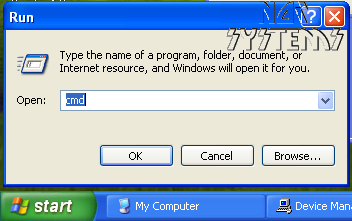
- With the scanner plugged to the PC Click Start and then click Run, in the Open field type CMD and then click OK
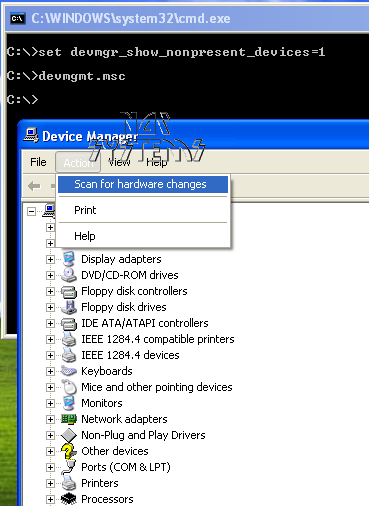
- At the command prompt, type following 2 lines of commands (do hit ENTER key after each command):
set devmgr_show_nonpresent_devices=1
devmgmt.msc
- On the Device Manager window popped up, click View and select Show hidden devices.
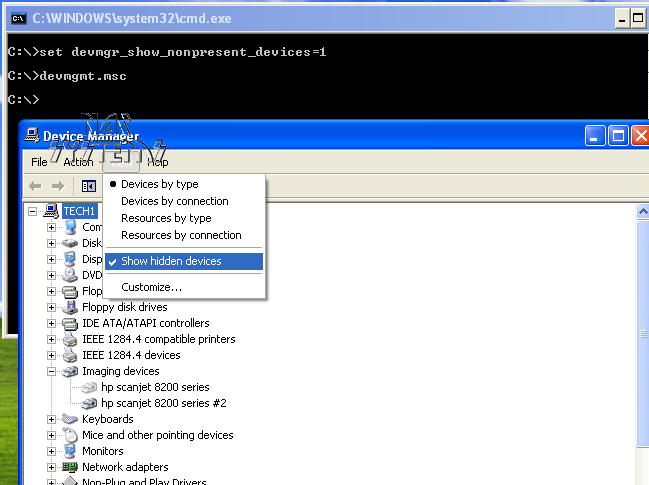
- Click the + sign next to Imaging Devices. Right-click on every HP Scanjet and click Uninstall.
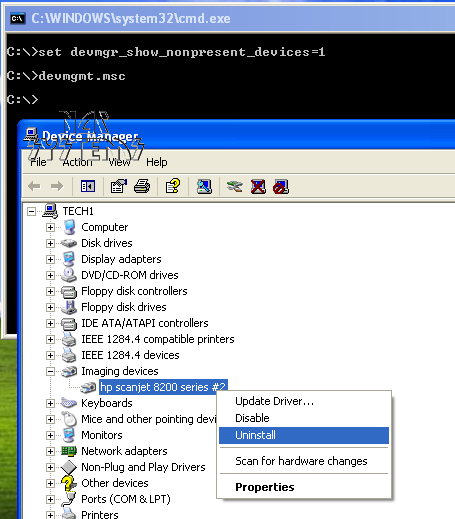
- Then click "Action" --> "Scan for Hardware Changes":
- After you see just one "hp scanjet 8200 series" re-appear under
"Imaging devices", the scanner is ready to work. Occasionally a restart of
Windows might be necessary,
and/or with unplugging/re-plugging power adapter of scanner (wait for 1 minute between)
|
|
|